
Markers on the words
Drop in your voiceover, transcribe it, and VoxMark lays a ranged, colour-coded marker on every phrase or word on the Cinema 4D timeline — checked against the audio itself.
Markers on the words
Drop in your voiceover, transcribe it, and VoxMark lays a ranged, colour-coded marker on every phrase or word on the Cinema 4D timeline — checked against the audio itself.
A transcript you can drive
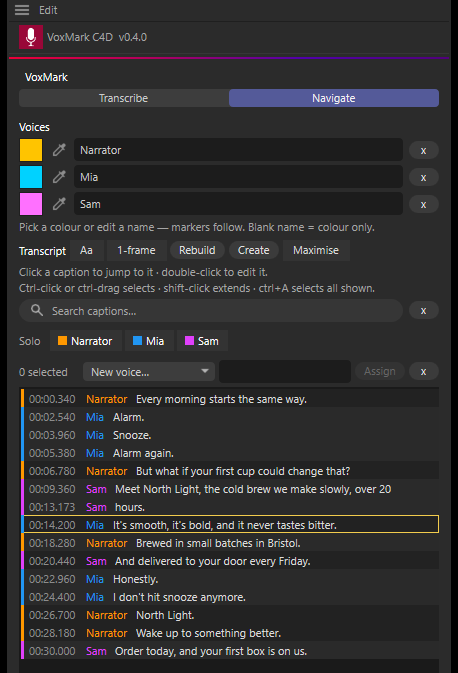
The Navigate tab is your whole voiceover as clickable captions. Click to jump the playhead, double-click to fix a word — the marker follows.
Every voice its own colour
AssemblyAI tells speakers apart automatically; with any provider you can assign voices by hand. Solo a voice to see only its markers.
SRT in, SRT out
Import an SRT — from VoxMark for After Effects or anywhere else — as markers, and export your transcript as an SRT with the frame rate and voice names on board.
VoxMark for Cinema 4D runs in Cinema 4D 2024 to 2027 on Windows and macOS (Apple Silicon).